
Knowing how to find out who won a government contract turns you from a guesser into a strategist. Every federal award is public record: the winning company, the dollar value, the agency, and the period of performance are all searchable for free. Most small businesses never look, which means the ones who do gain an edge that enterprise “market intelligence” platforms charge five figures to package. This guide shows you where the award data lives in 2026 (it has moved), how to use it to identify your real competitors, and how to spot incumbent contracts that are about to re-compete, which are some of the best opportunities a prepared challenger can find.
Where the award data lives now (it changed in 2026)
The single most useful free tool is USASpending.gov, the official open-data record of all federal spending: contracts, grants, and loans. It is free, needs no account, and lets you search awards by agency, geography, NAICS code, and recipient.
One important update: the Federal Procurement Data System (FPDS), which older guides send you to for contract award reports, is being consolidated. Its public-facing search is retiring and now redirects to SAM.gov, where the granular contract reporting now lives. So the modern workflow is two tools, not the old three.

The 2026 contract-research toolkit
| Tool | What it is best for | Cost |
|---|---|---|
| USASpending.gov | Government-wide spending, top winners by NAICS, trends | Free |
| SAM.gov (contract reports) | Granular award records, scope, dates (FPDS’s successor) | Free |
| Agency procurement forecasts | What an agency plans to buy next | Free |
| Enterprise intelligence tools | The above, repackaged with analytics | Five figures/yr |
The last row is the point: the raw material of “market intelligence” is public and free. You are paying enterprise platforms for the packaging, not the data. (We compared those platforms in our GovWin IQ alternatives guide.)
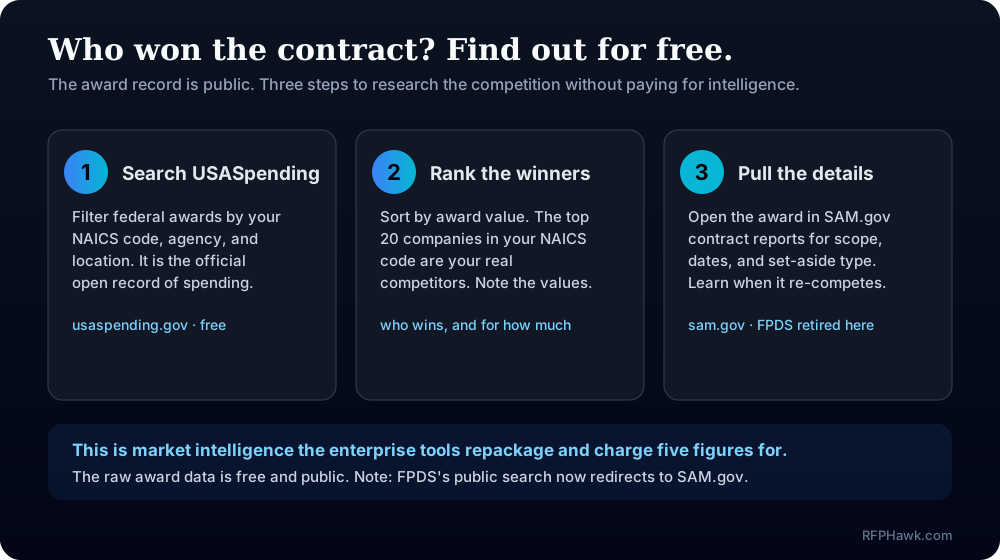
How do you find out who won a specific contract?
Work the tools in a simple order, from broad to specific.
- Start on USASpending.gov. Use the Advanced Search and filter by your NAICS code, the agency you care about, and a recent time period. This returns the awards that match your line of work.
- Sort by award amount. The largest recipients rise to the top. These are the companies actually winning the money in your category, not the ones with the flashiest websites.
- Open a specific award. Each record shows the recipient, the value, the awarding agency, and the period of performance. This is the “who won and for how much” answer in plain data.
- Pull the contract detail in SAM.gov. For scope, set-aside type, and reporting specifics, follow through to the contract report in SAM.gov, which now hosts what FPDS used to.
- Note the end date. The period of performance tells you roughly when the work will re-compete, which is the strategic gold covered below.
Pro Tip: Download the search results as a spreadsheet from USASpending. A saved CSV of the top winners in your NAICS code becomes a competitor list you can update quarterly in minutes.
How do you use award data to research competitors?
The most valuable move is turning award history into a competitor map. Pull the top companies by award value for your NAICS code, and you are looking at your real competition.
For each one, the public record tells you plenty:
- Which agencies buy from them. Concentrated relationships reveal where a competitor is strong, and where they are not, which is where you look.
- At what values. The typical award size shows you which tier of work you would actually be competing for.
- How often they win. A firm with many small awards behaves differently from one with a few large ones, and you position against each differently.
- Whether the work was set aside. If a competitor keeps winning small-business set-asides you also qualify for, that is a direct, winnable overlap.
“Your competitors’ win history is a free strategy document they publish without meaning to. Read it before you write a single proposal.” — a habit every serious capture effort shares
This is the same instinct behind responding to sources sought notices: the more you know before the RFP, the better you compete when it lands.
How do you spot contracts about to re-compete?
Here is where award research becomes offense instead of homework. Most federal contracts have a defined period of performance, and when it ends, the work is re-competed. An incumbent re-competing is one of the best targets for a challenger, because the requirement is known, the budget is established, and the incumbent may be vulnerable.
The play is straightforward:
- Find awards in your NAICS code with periods of performance ending in the next 6 to 18 months.
- Research the requirement now, while you have time, not when the RFP drops with a three-week clock.
- Position early: build past performance, line up teaming partners, and prepare your capability statement against that specific need.
- Watch for the re-compete solicitation and the sources sought notice that often precedes it.
Reactive vs. proactive contract research
| Approach | When you learn about the work | Your position |
|---|---|---|
| Reactive | When the RFP posts, with weeks to respond | Scrambling, behind incumbents |
| Proactive | 6 to 18 months early, from award data | Prepared, sometimes shaping the requirement |
What goes wrong with contract research?
A few predictable mistakes blunt the advantage.
Using stale guides. Any resource telling you to search FPDS.gov directly is out of date; start at USASpending and SAM.gov instead. Confusing biggest with relevant. The largest recipients overall are not your competitors; filter to your NAICS code and award tier first. Researching once. Award data updates constantly. A one-time look is a snapshot; a quarterly refresh is intelligence. Forgetting it is free. If a vendor is selling you “exclusive” award data, remember the underlying record is public and costs nothing.
Key takeaways
| Point | Details |
|---|---|
| The award record is public and free | USASpending.gov shows who won, for how much, from which agency |
| FPDS moved | Its public search now redirects to SAM.gov, which hosts the contract reports |
| Top NAICS winners are your competitors | Rank recipients by award value to find your real competition |
| Periods of performance signal re-competes | Contracts ending in 6 to 18 months are prepared-challenger targets |
| Enterprise “intelligence” repackages free data | You pay for analytics and convenience, not the underlying records |
Why we fold award context into the feed
We built RFPHawk on the belief that a small business should compete on preparation, not budget, and award data is preparation you can get for free. Our feed surfaces the open solicitations filtered to your industry and location, and the smartest way to use it is alongside the free award record: see what is open now in our feed, then check USASpending to learn who won the last one and what it went for. You can browse the live feed without an account, and a free account filters everything to your NAICS codes and region, so the opportunities you research and the competitors you study line up around the same, focused list.
— The RFPHawk Team
Frequently asked questions
How do you find out who won a government contract?
Search USASpending.gov, the official public record of federal awards. Filter by NAICS code, agency, or location to see the winning company, the award value, and the period of performance. For granular contract reports, SAM.gov now hosts the data that FPDS used to serve.
Is USASpending.gov free?
Yes. USASpending.gov is the free, official open-data source for federal spending, including contract awards, grants, and loans. Anyone can search and download the data without an account, which makes it the cheapest competitor-research tool in government contracting.
What happened to FPDS?
The Federal Procurement Data System’s public-facing search is being retired and consolidated into SAM.gov. Where guides once pointed to FPDS.gov for contract award reports, that data and reporting now live under SAM.gov’s contracting area, alongside USASpending for spending analysis.
How do you research government contract competitors?
Pull the top companies by award value for your NAICS code on USASpending.gov. Those are your primary competitors. Study which agencies buy from them, at what values, and when their contracts expire, so you can position and time your own bids.
Can you see when a government contract expires?
Often yes. Award records show the period of performance, so you can estimate when a contract will re-compete. Incumbent contracts re-competing are among the best opportunities for a challenger who has done the homework in advance.
Recommended
- How to Win Your First Government Contract — the roadmap this research feeds into
- What Is a Sources Sought Notice — get ahead of a re-compete before the RFP
- GovWin IQ Alternatives — when free award data is not enough
Put RFPHawk to work on your pipeline.
Federal SAM.gov plus a growing list of state portals, refreshed daily and scored against your profile so you see the bids worth pursuing first.
Start free — no credit card