
Setting up government RFP alerts is the difference between spending your mornings hunting for opportunities and having the right ones land in your inbox. The catch is that most people’s alerts don’t work: they’re either so broad that the daily email becomes noise you stop opening, or so narrow that the good opportunities slip past. This guide shows how to set up bid alerts that actually surface winnable work — the filters that matter, how to tune out the noise, and how often to run them.
Why most RFP alerts fail
An alert is only as good as the filters behind it, and there are two ways to get those filters wrong.
Too broad is the most common failure. Someone sets a keyword alert for “software” or “consulting,” gets 60 notices a day from every corner of the country, skims the first few for a week, and then stops opening the email entirely. Noise trains you to ignore the channel.
Too narrow is the quieter failure. Filters so tight — one NAICS code, one state, an exact phrase — that real opportunities using slightly different language never trigger the alert. You feel organized, but you’re missing bids you’d have wanted.
A good alert system threads the needle with a few things working together:
- Hard filters you control: scope (federal, national, or specific states), NAICS codes, and keywords.
- Scoring, so the best-fit opportunities rise to the top instead of arriving in random order.
- Deduplication, so you never see the same notice twice across days.
- A cap, so one chatty agency can’t flood the whole digest.

Not every source gives you all of that. Here’s how the common ones compare.
| Source | Alert type | Match scoring | Coverage | Cost |
|---|---|---|---|---|
| SAM.gov saved search | Email notification | No | Federal only | Free |
| State portals | Email (varies) | No | One state each | Mostly free |
| Paid aggregators | Limited | Federal + S&L | $$$ | |
| RFPHawk digest | Daily/weekly email | Yes | Federal + growing S&L | Pro plan |
The shape of a good alert is a funnel: a broad pool of new notices, narrowed by your filters, ranked by fit, and delivered as a short list.
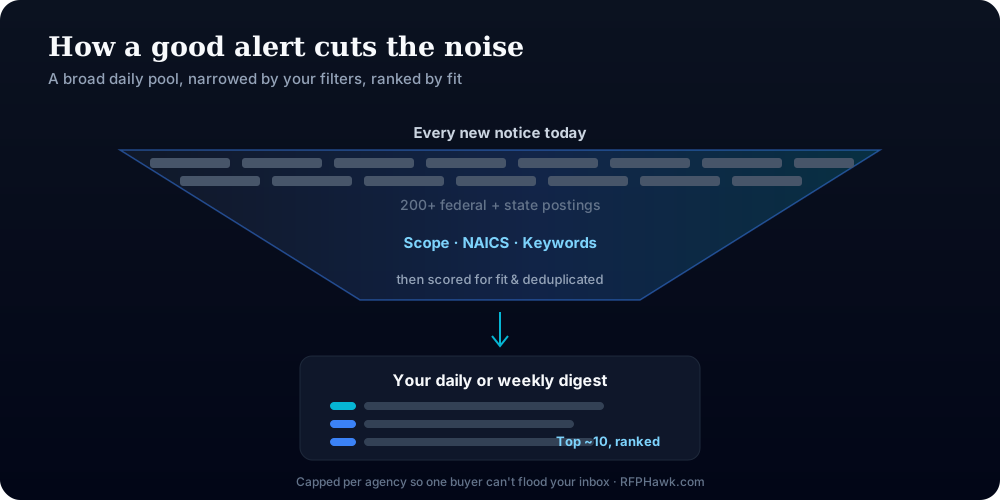
The free baseline — a SAM.gov saved search with email notifications — is worth setting up regardless. Just know its ceiling: an unranked list, federal only, with no way to tell a perfect fit from a long shot.
Pro Tip: Set your very first alert broad on purpose, for one week only. Watch what comes in, note which notices you’d actually pursue, then tighten the filters to match that pattern. Real results tune better than guesses.
How do you set up RFP alerts that actually work?
The setup is the same idea on any platform; the fields just have different names.
- Set your scope first. Decide whether you want federal, national, or specific states. Scope is the single biggest lever on volume — a national keyword alert with no geographic limit is where most noise comes from.
- Add your NAICS codes. These are the backbone of a good alert, because they filter by what you do rather than by words that happen to appear in a notice. If you’re unsure which codes fit, see our guide to picking the right NAICS codes.
- Layer in targeted keywords. Use specific phrases (“wetland delineation,” “badge access control”) rather than single common words (“services,” “IT”). Keywords should catch the opportunities your NAICS codes miss, not double the noise.
- Choose a frequency. Daily for your core, fast-moving work; weekly for exploratory or slower state and local searches (more on this below).
- Refine after a week. Too much noise, tighten scope or keywords. Too quiet, add a NAICS code or broaden a phrase. Alerts are a dial, not a switch.
Pro Tip: Run two alerts, not one giant one: a tight “pursue now” alert on your core NAICS with a daily cadence, and a looser “keep an eye out” alert on adjacent work weekly. Mixing both into a single alert is what creates the noise you learn to ignore.
How do you cut the noise without missing good bids?
When an alert isn’t working, the fix is almost always in the filters. Diagnose it by which way it’s failing.
If you’re drowning in noise:
- Add or tighten your scope — geography is the fastest way to cut volume.
- Make keywords specific phrases, not single words that appear in every notice.
- Lean on NAICS codes as the primary filter and treat keywords as a supplement.
If you’re getting too little:
- Add adjacent NAICS codes you’re eligible for but forgot.
- Broaden a keyword phrase or add a synonym agencies actually use.
- Widen scope by one or two neighboring states.
Either way:
- Prefer a tool that scores matches, so you can leave the net a little wider and still see the best fits first.
- Make sure alerts deduplicate, or a re-posted notice will feel like noise even when the filter is right.
“The instinct when an alert is noisy is to delete it. The better move is to tighten one filter at a time and watch what changes. You’re training a system, not fighting it.” — a common refrain among business-development leads
Daily or weekly — how often should alerts run?
Frequency is a real decision, not a default. The right cadence depends on how fast the work moves and how you actually process email.
- Daily suits federal opportunities (SAM.gov posts throughout the day) and any niche where response windows are short and being early matters.
- Weekly suits slower state and local work, exploratory searches, or anyone who’d let a daily email pile up unread.
| Daily digest | Weekly digest | |
|---|---|---|
| Best for | Federal + fast-moving work | State/local + exploratory |
| Risk | Volume fatigue if filters are loose | Missing a short-deadline bid |
| Ideal filters | Tight, core NAICS | Broader, adjacent work |
| Who it fits | Active pursuers | Pipeline-watchers |
Most contractors end up running daily on their core NAICS and weekly on the exploratory stuff — the same two-alert split from earlier. If you’re still getting set up on the federal side, our guide to finding government RFPs covers the sources those alerts should draw from.
Key Takeaways
Good RFP alerts come from combining filters — scope, NAICS, and keywords — then scoring and deduplicating the results so you get a short, ranked list instead of a firehose.
| Point | Details |
|---|---|
| Combine filters, don’t stack one | Scope + NAICS + targeted keywords together beat any single broad filter. |
| NAICS is the backbone | It filters by what you do, not by words that happen to appear in a notice. |
| Scoring lets you cast wider | With ranking, you can keep the net broad and still see the best fits first. |
| Match cadence to the work | Daily for fast federal work, weekly for slower or exploratory searches. |
| Run two alerts, not one | A tight daily “pursue” alert and a looser weekly “watch” alert beat one noisy catch-all. |
Why “more alerts” is the wrong goal
We’ve watched a lot of contractors treat alerts like a volume game — more keywords, more sources, more notifications — as if seeing every possible opportunity were the point. It isn’t. The point is to spend your limited business-development hours only on the bids you have a real shot at winning, and a firehose actively works against that. When every email has 50 listings, you triage none of them well.
The contractors who win consistently do the opposite. They run a small number of tight, well-tuned alerts, they trust the filters enough to act on what comes through, and they revisit the setup every few weeks as they learn what they actually pursue. Their inbox is quieter and their pipeline is fuller. The goal was never to see everything — it was to see the right things early enough to do something about them.
— The RFPHawk Team
RFPHawk alerts: scored, deduped, and capped at what matters
This is exactly what RFPHawk’s alerts are built to do. You set the scope (federal, national, or specific states), the NAICS codes, and any keywords; RFPHawk then matches new opportunities against those filters, scores each one against your profile, deduplicates against what you’ve already been sent, and caps how many can come from any single agency so one school district can’t dominate your digest. The result lands as a daily or weekly email — a short, ranked list, not a raw feed.
You can browse live opportunities free to see what’s out there. The scored daily and weekly digests — along with match scoring, saved searches, and pipeline tracking — are part of RFPHawk Pro, which you can try free for 14 days (cancel anytime before it bills). It’s the difference between checking portals every morning and having the right bids find you.
FAQ
How do I set up alerts for government contracts?
Define your scope (federal, national, or specific states), add the NAICS codes that describe your work, layer in a few targeted keywords, and choose a daily or weekly email frequency. On SAM.gov this is a saved search with email notifications; tools like RFPHawk add match scoring and deduplication.
Why do my RFP alerts have so much noise?
Almost always because the filters are too broad — usually keyword-only with no NAICS or scope limits. Add your NAICS codes, restrict the geographic scope, and make keywords specific phrases rather than single common words. Signal comes from combining filters, not stacking one.
Should RFP alerts be daily or weekly?
Daily for federal opportunities, since SAM.gov posts throughout the day and some response windows are short. Weekly is fine for slower-moving state and local work, or if a daily email would go unread. Many contractors run daily for their core NAICS and weekly for exploratory searches.
Are SAM.gov alerts free?
Yes. SAM.gov lets you save searches and receive email notifications at no cost. The limitation is that SAM.gov alerts have no match scoring, no ranking, and no cross-portal coverage — you still get an unranked list and no state or local opportunities.
What makes a good RFP alert system?
Hard filters you control (scope, NAICS, keywords), match scoring so the best fits rise to the top, deduplication so you never see the same notice twice, a cap so one agency can’t flood the digest, and coverage beyond just federal. The goal is a short, ranked list — not a firehose.
Put RFPHawk to work on your pipeline.
Federal SAM.gov plus a growing list of state portals, refreshed daily and scored against your profile so you see the bids worth pursuing first.
Start free — no credit card